Dead zones are frustrating because they feel random: one room is fine, the next room drops calls and buffers nonstop. When people try to fix it, they usually choose between a Wi-Fi extender (cheap and quick) or a mesh system (more expensive but “whole-home”). The truth: both can work—but only in the right situation.
Here’s the real, practical answer to which one actually fixes dead zones.
First: why dead zones happen (so you buy the right fix)
Most dead zones come from:
- Distance from the router (simple)
- Thick walls (concrete, brick, tile, plaster)
- Bad router placement (corner of the home, inside a cabinet)
- Crowded Wi-Fi (apartments with dozens of networks)
- Too many devices (smart home + streaming + work calls)
A solution that works in a small apartment may fail in a multi-floor house—because the problem isn’t the same.
What a Wi-Fi extender actually does
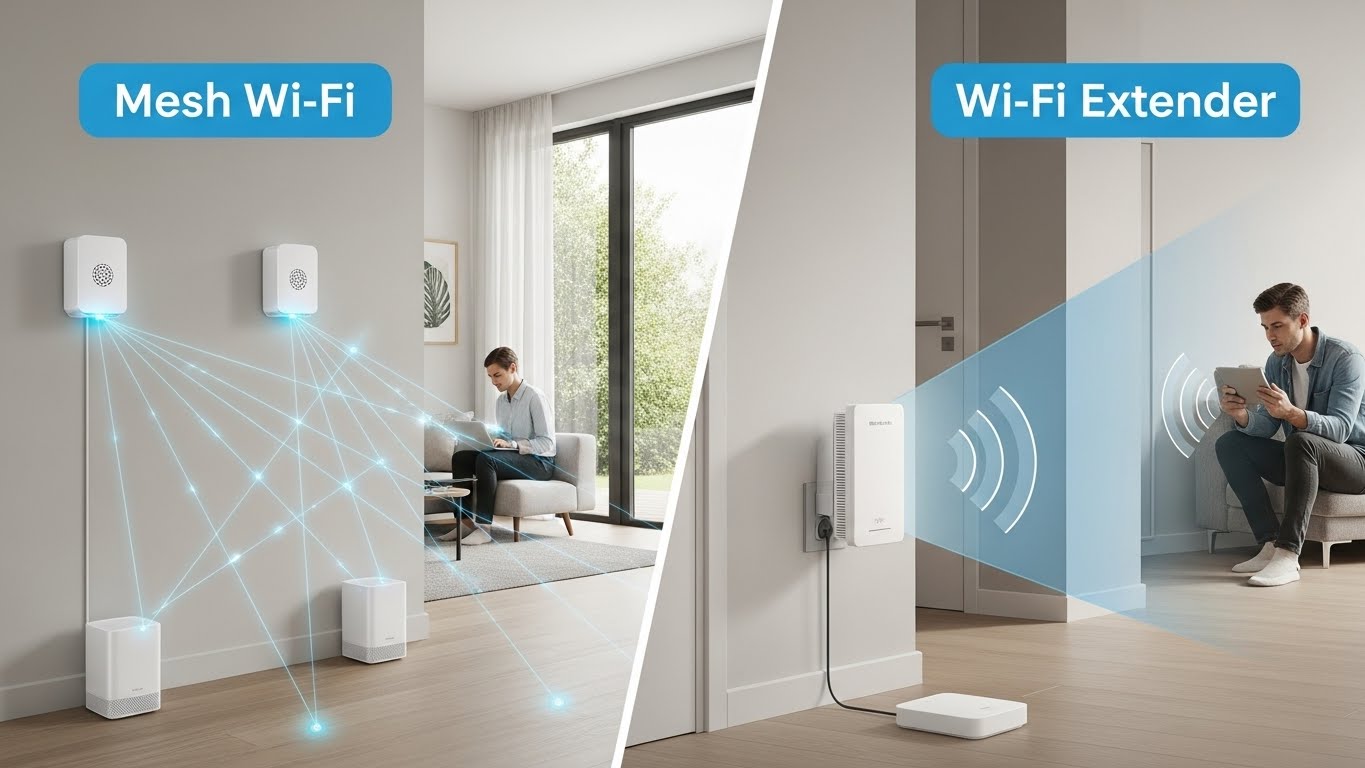
A Wi-Fi extender (repeater) grabs your existing Wi-Fi signal and re-broadcasts it.
When extenders work well
- You have one dead zone (back bedroom, garage corner)
- Your router signal is still decent halfway to the dead zone
- You want a cheap fix and don’t mind a little tweaking
Extender downsides (why people complain)
- If you place it inside the dead zone, it repeats a weak signal → still bad
- It can create a second network name (unless it supports seamless roaming)
- Some extenders cut speeds because they’re doing double duty (receive + transmit)
Bottom line: A good extender can fix a dead zone—but only if it’s placed correctly and the original signal isn’t already too weak.
What a mesh system actually does
A mesh system uses multiple nodes that work together as one network. One node connects to your modem, and the others spread around your home to create blanket coverage.
When mesh works best
- You have multiple dead zones or a larger space
- You want seamless roaming (one network name, fewer dropouts)
- You need stability for streaming + work calls + gaming
- Your home has weird layout or multiple floors
Mesh downsides (what people don’t realize)
- It’s more expensive
- Placement still matters—bad node placement = mediocre results
- If the nodes are too far apart and use wireless backhaul, performance can drop
Bottom line: Mesh usually fixes dead zones more reliably than extenders, especially across multiple rooms/floors.
The real answer: which one actually fixes dead zones?
If you want the highest chance of success:
✅ Mesh Wi-Fi is the more reliable solution in most homes.
Why? Because mesh doesn’t just “repeat” a weak signal. It moves the network closer to where you need it.
But…
If your situation is simple:
✅ A Wi-Fi extender can be the smarter buy if you only have one weak spot.
Quick decision guide (most accurate)
Pick a Wi-Fi extender if:
- Your home is small/medium and you only have one dead zone
- Your internet plan is moderate
- You can place the extender halfway between router and dead zone
- You want the cheapest fix that still works
Pick a Mesh system if:
- You have multiple dead zones
- You have 2+ floors or lots of thick walls
- You care about stable video calls, gaming, 4K streaming
- You want one network name and fewer disconnects
The “one rule” that decides extender success
Never plug an extender inside the dead zone.
Plug it where your phone still shows a strong signal—roughly halfway.
Extender success is mostly placement.
Speed + stability: who wins?
Stability
- Mesh wins: roaming is smoother, fewer random drops
- Extender can be stable, but depends more on configuration
Speed
- Extenders can reduce speed (repeating adds overhead)
- Mesh can also lose speed if nodes connect wirelessly and are far apart
- Best speed for mesh is when you can use Ethernet backhaul (wired connection between nodes)
In apartments (crowded Wi-Fi)
- Mesh can be better if it’s a modern system with smart band management
- But a well-placed extender can still work if you’re fixing one spot
My “real-world” recommendations by home type
Studio / 1-bedroom apartment
- Extender is often enough (one dead spot near bedroom or kitchen).
- Mesh is only needed if walls are thick concrete or Wi-Fi is crowded and unstable everywhere.
2–3 bedroom apartment / thick walls
- If you’re losing signal in multiple rooms: Mesh.
- If only one room struggles: Extender (placed halfway).
Multi-floor house
- Mesh almost always wins.
- Extenders can work but become messy (multiple extenders = multiple points of failure).
Signs you should skip both and go wired (best fix)
If you have very thick concrete walls or need perfect stability:
- run Ethernet to a second access point, or
- use MoCA (coax) if your home has cable wiring
Wired backhaul is the “I’m done messing around” solution.
Final verdict
- Best overall fix for dead zones: Mesh Wi-Fi
- Best budget fix for one weak area: Wi-Fi extender (placed correctly)